
DNS
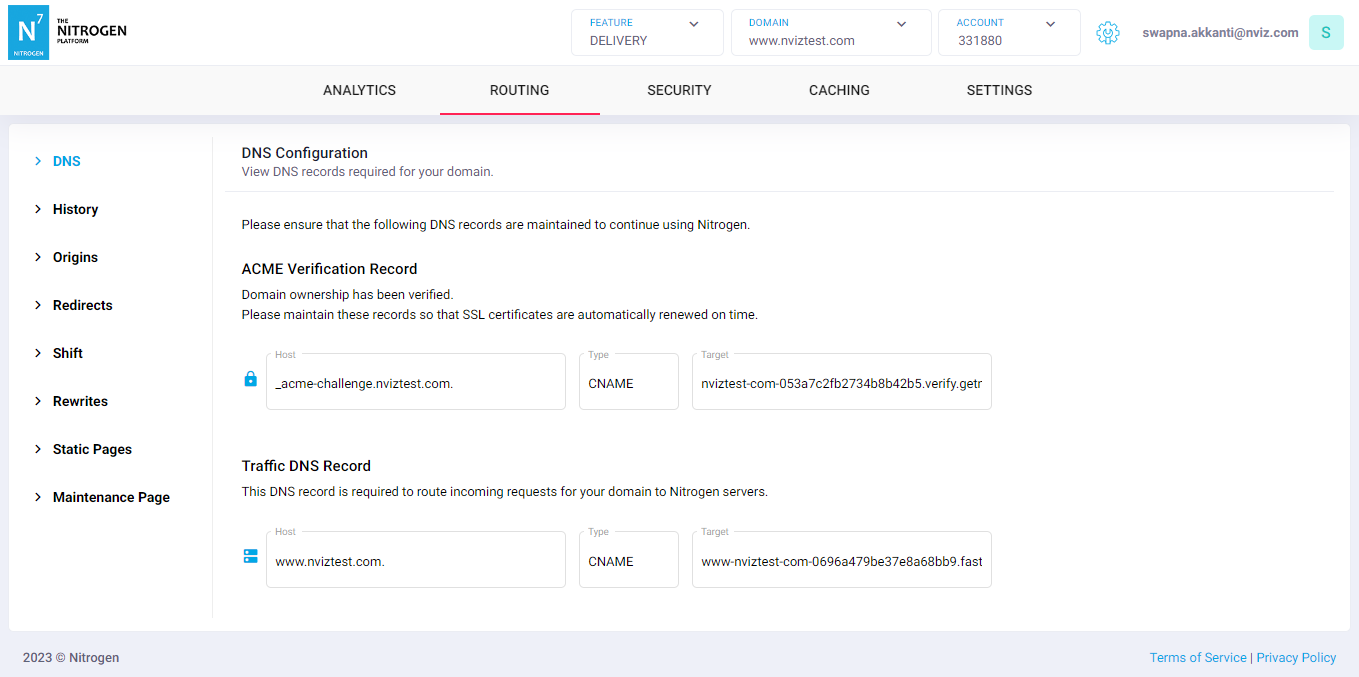
This screen will display you the CNAMEs/A-records that needs to be configured to confirm your ownership over domain, and to move the traffic through Nitrogen.
*Note: For demo purpose, we will be using www.nviztest.com domain as an example.
Prerequisite#
- You must have an account on Nitrogen
- You must have some domain registered on Nitrogen.
Steps#
Select the respective
AccountandDomainfrom the dropdowns at the top right corner.Then select
DNStab. You will be shown a screen with CNAMEs/A-records that you need to maintain at your DNS-provider’s portal such as GoDaddy.Provide the respective details.
ACME Verification Record: Maintain this record to prove your ownership ovr domain. This will also ensure automatic SSL certificate renewal.Traffic DNS Record: Map your domain with the given CNAME/A-records, so that traffic will start flowing through Nitrogen.
If any record is not maintained, it will be shown with a Red icon, else it will be Blue.
Notes#
- Please do not delete ACME Verification Record after SSL is issued to ensure no issues with the ongoing traffic.