
CSP
This page will show you the step to configure CSP (Content-Security-Policy) response header for your site. Refer this MDN link
for more details.It allows website administrators to control resources the user agent is allowed to load for a given page. This helps guard against cross-site scripting attacks (Cross-site_scripting).Note: For demo purpose, we will be using www.nviztest.com domain as an example.
Prerequisite#
- You must have a domain configured on Nitrogen.
Steps#
Click on
Securitymenu, and openCSPtab.You will be taken to screen to provide details.
Content Security Policy: Enter the values permitted for this header, and required for your domain:
e.g.upgrade-insecure-requests: instructs user agents to treat all of a site’s insecure URLs (served over HTTP) as though they have been replaced with secure URLs (served over HTTPS).self: Only allow resources from the current origin.frame-src: Specifies valid sources for nested browsing contexts loading using elements such as frame and iframe elementsframe-ancestors: Specifies valid parents that may embed a page using frame, iframe, object, or embed elements
Note: Refer this MDN link for more details.
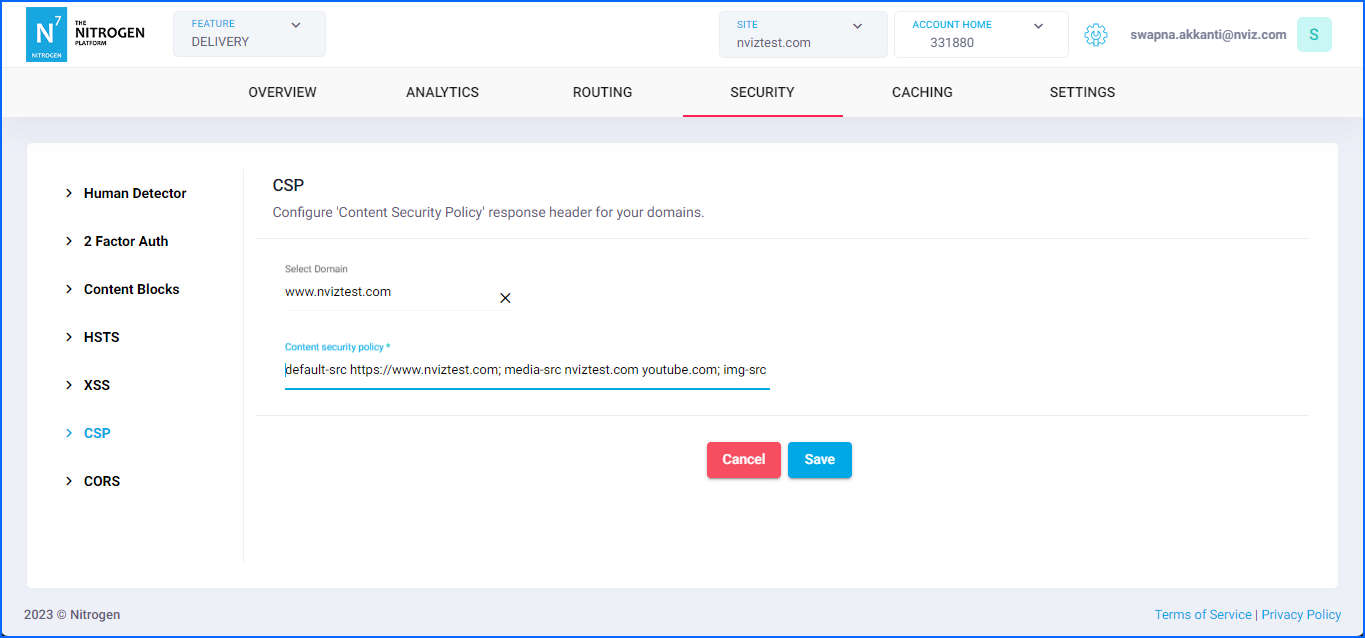
Click on
Savebutton.
Notes#
These changes will only take effect when deployed. Saving them will only be saving them in draft. Please refer documentation about Deploy process for it.