Dynamic IP blacklist/whitelist management
Nitrogen Target Groups are a subset of Condition Groups used for whitelisting and blacklisting IP addresses. They can be added to Content Blocks to control traffic behavior.
The Target Groups API allows you to list target groups, retrieve specific target group details, and dynamically add or remove target IP addresses (both IPv4 and IPv6) and CIDR prefixes.
Unlike standard configuration changes that require manual deployment, updates to target groups are automatically and immediately deployed to the edge.
Configured target groups are also accessible in the dashboard UI under Delivery > Settings > IP Address Groups.
Prerequisite#
- You must have a domain configured on Nitrogen.
- You must have a service account configured with Editor access. If not, you can refer this article for the same.
- You must have created atleast one IP based condition for blocklist and whitelist in Dash that you can use in the target-groups APIs. You can refer this for the steps.
Endpoints#
1. List Target Groups#
Retrieve a list of all target groups (specifically IP-based condition groups) configured for a domain.
List target groups API - Request Details#
GET https://dash.n7.io/api/v2/security/domains/{domain}/target-groups
Authorization: Token <api-key-of-service-account>
If using Postman, set the
Auth TypetoNo Auth. And then set theAuthorizationheader in theHeaderssection.
List target groups API - Path Parameters#
domain(required): The domain name configured on Nitrogen (e.g.,www.example.com).
List target groups API - Example Request#
curl -X GET "https://dash.n7.io/api/v2/security/domains/www.example.com/target-groups" \
	-H "Authorization: Token 121212
List target groups API - Response#
On success (HTTP 200), returns the list of target groups.
{
	"domain": "www.example.com",
	"targetGroups": [
		{
			"domain": "www.example.com",
			"id": "e28f3a38-c649-4eb1-995a-b68e7dc71e0c",
			"name": "Office IP Group",
			"ipv4": [
				"192.0.2.1",
				"198.51.100.0/24"
			],
			"ipv6": [
				"2001:db8::1"
			],
			"entries": 3
		}
	]
}
2. Get Target Group Details#
Retrieve the details of a specific target group by its unique ID.
Get Target Group Details API - Request Details#
GET https://dash.n7.io/api/v2/security/domains/{domain}/target-groups/{id}
Authorization: Token <api-key-of-service-account>
Get Target Group Details API - Path Parameters#
domain(required): The domain name configured on Nitrogen.id(required): The unique ID of the target group.
Get Target Group Details API - Example Request#
curl -X GET "https://dash.n7.io/api/v2/security/domains/www.example.com/target-groups/e28f3a38-c649-4eb1-995a-b68e7dc71e0c" \
	-H "Authorization: Token 121212
Get Target Group Details API - Response#
On success (HTTP 200), returns the target group details.
{
	"domain": "www.example.com",
	"id": "e28f3a38-c649-4eb1-995a-b68e7dc71e0c",
	"name": "Office IP Group",
	"ipv4": [
		"192.0.2.1",
		"198.51.100.0/24"
	],
	"ipv6": [
		"2001:db8::1"
	],
	"entries": 3
}
3. Add Targets#
Add IP addresses or CIDR blocks (both IPv4 and IPv6) to an existing target group.
Add Targets API - Request Details#
POST https://dash.n7.io/api/v2/security/domains/{domain}/target-groups/{id}/targets:add
Authorization: Token <api-key-of-service-account>
Content-Type: application/json
Add Targets API - Path Parameters#
domain(required): The domain name configured on Nitrogen.id(required): The unique ID of the target group.
Add Targets API - Payload Parameters#
ipv4(optional): An array of strings containing IPv4 addresses or CIDR prefixes to add. Maximum 200 items.ipv6(optional): An array of strings containing IPv6 addresses or CIDR prefixes to add. Maximum 200 items.
If you cross these limits by adding the IPs, an error will be returned. In that case, you can create a new target group from Dash - and use it in the API.
Add Targets API - Example Request#
curl -X POST "https://dash.n7.io/api/v2/security/domains/www.example.com/target-groups/e28f3a38-c649-4eb1-995a-b68e7dc71e0c/targets:add" \
	-H "Authorization: Token 121212" \
	-H "Content-Type: application/json" \
	-d '{
		"ipv4": [
			"198.51.100.10"
		],
			"ipv6": [
			"2001:db8::2"
		]
	}'
Add Targets API - Response#
On success (HTTP 200), returns a confirmation message.
{
	"message": "Ok"
}
4. Remove Targets#
Remove IP addresses or CIDR blocks (both IPv4 and IPv6) from an existing target group.
Remove Targets API - Request Details#
POST https://dash.n7.io/api/v2/security/domains/{domain}/target-groups/{id}/targets:remove
Authorization: Token <api-key-of-service-account>
Content-Type: application/json
Remove Targets API - Path Parameters#
domain(required): The domain name configured on Nitrogen.id(required): The unique ID of the target group.
Remove Targets API - Payload Parameters#
ipv4(optional): An array of strings containing IPv4 addresses or CIDR prefixes to remove. Maximum 200 items.ipv6(optional): An array of strings containing IPv6 addresses or CIDR prefixes to remove. Maximum 200 items.
Remove Targets API - Example Request#
curl -X POST "https://dash.n7.io/api/v2/security/domains/www.example.com/target-groups/e28f3a38-c649-4eb1-995a-b68e7dc71e0c/targets:remove" \
	-H "Authorization: Token 121212" \
	-H "Content-Type: application/json" \
	-d '{
		"ipv4": [
		"198.51.100.10"
		]
	}'
Remove Targets API - Response#
On success (HTTP 200), returns a confirmation message.
{
	"message": "Ok"
}
Behavior and Constraints#
- Immediate & Automatic Deployment: Unlike standard configuration updates (which are saved as drafts and must be deployed manually), changes made to Target Groups via the API are automatically and immediately deployed to the edge.
- Duplicate Prevention: Adding an IP address or CIDR prefix that already exists in the target group is a no-op, it will be silently ignored. Similarly, removing an IP address or CIDR prefix that does not exist in the target group is also a no-op.
- Audit Trail: Every update to a target group automatically generates an entry in the deployment history logs with a comment detailing the action, e.g.,
"Add IP targets to group <GroupName>"or"Remove IP targets from group <GroupName>". - Static Target Groups: Certain target groups are defined as static configuration and cannot be modified. Any attempt to add or remove targets on these groups will return an error response:
Static condition groups cannot be modified. - Pending Version Lock: If there are other pending changes to the domain’s configuration (i.e., the requested version does not match the currently deployed version), the update request will fail with an error response:
other changes are pending, please continue after sometime. - Input Constraints:
- Up to 200 IPv4 targets or 200 IPv6 targets can be specified in a single API request and up to 200 targets including IPv4 and IPv6 supported in a single target group.
- All items must be valid IP addresses (e.g.,
192.0.2.1) or CIDR prefixes (e.g.,198.51.100.0/24).
Error Responses#
When an error occurs, the API returns a non-200 HTTP status code with the following JSON payload:
{
	"code": <error_code>,
	"message": "<error_message>",
	"details": []
}
Common error messages include:
No target group with the provided ID was found.other changes are pending, please continue after sometime
Notes#
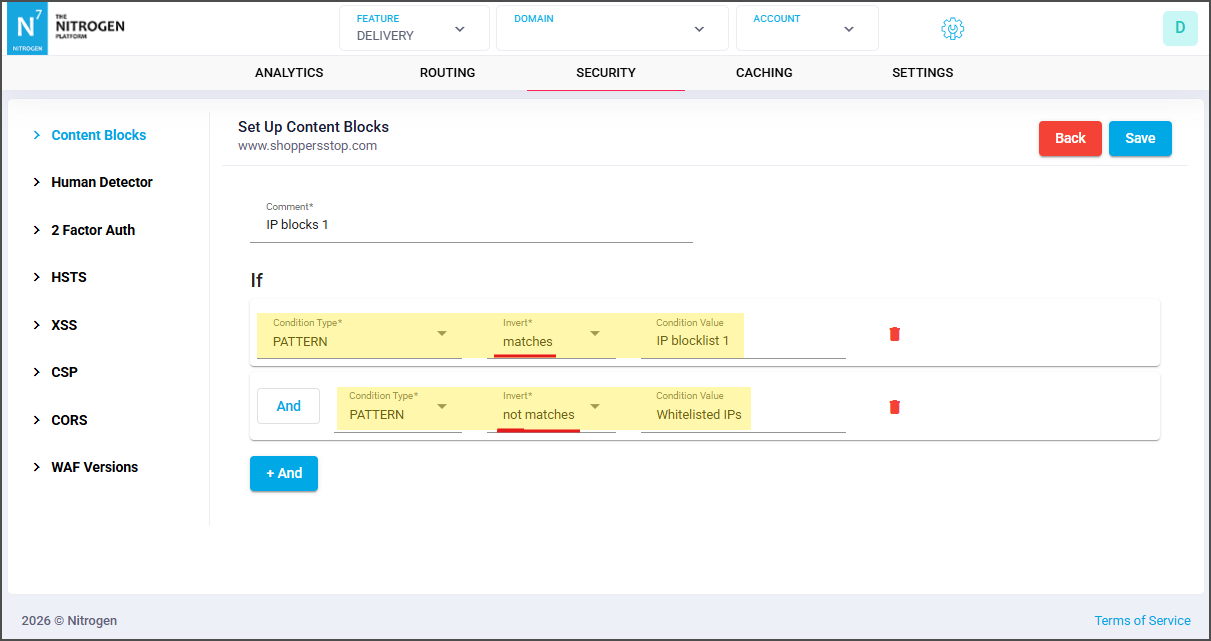
- Whitelisting : If you are managing the IP whitelisting with this approach, please add the whitelist group as a
not-matchescondition in content-block rule like below :