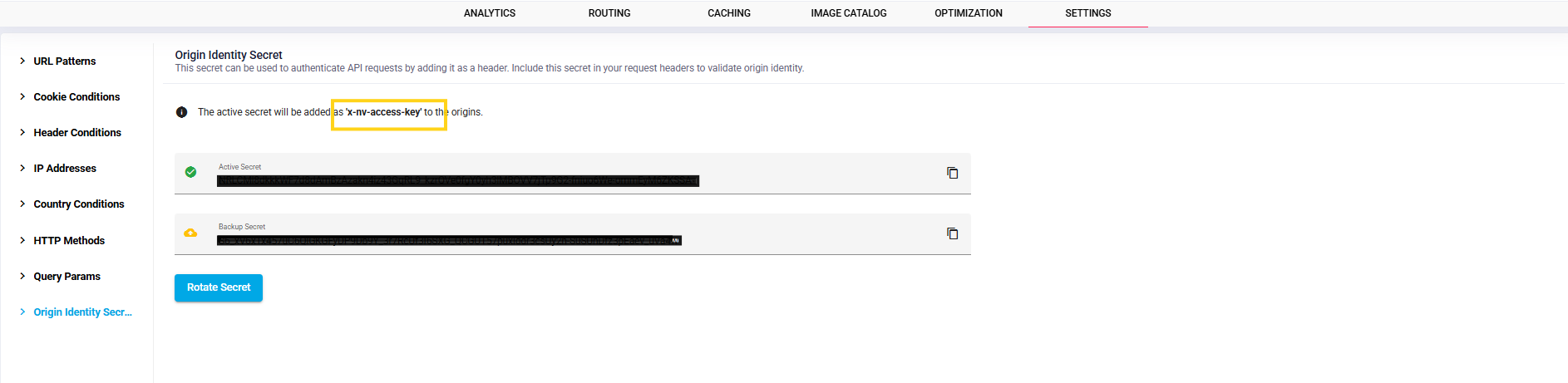
Origin Identity Secret
This page provides the steps to find the Origin Identity Secret details for a domain configured on Nitrogen. These details can be used at your origin to allow and authenticate legitimate requests routed through N7.The Origin Identity Secret can be used to authenticate requests by adding it as a request header. Include the domain-specific secret value in the request header to allow the origin to validate that the request originated from N7.Note: For demo purpose, we will be using www.nviztest.com domain as an example.
Prerequisite#
- The domain must be configured on Nitrogen.
Steps#
Select the relevant domain from the
Domaindropdown and clickSettingsin the top navigation bar.From the left-hand navigation menu, click
Origin Identity Secret.The
Origin Identity Secretpage will display thex-nv-access-keyrequest header along with the corresponding secret value for the selected domain.Use this domain-specific
x-nv-access-keyheader and secret value at your origin to authenticate requests routed through N7.